
Smart cycling route planner for weekend rides: a step-by-step guide
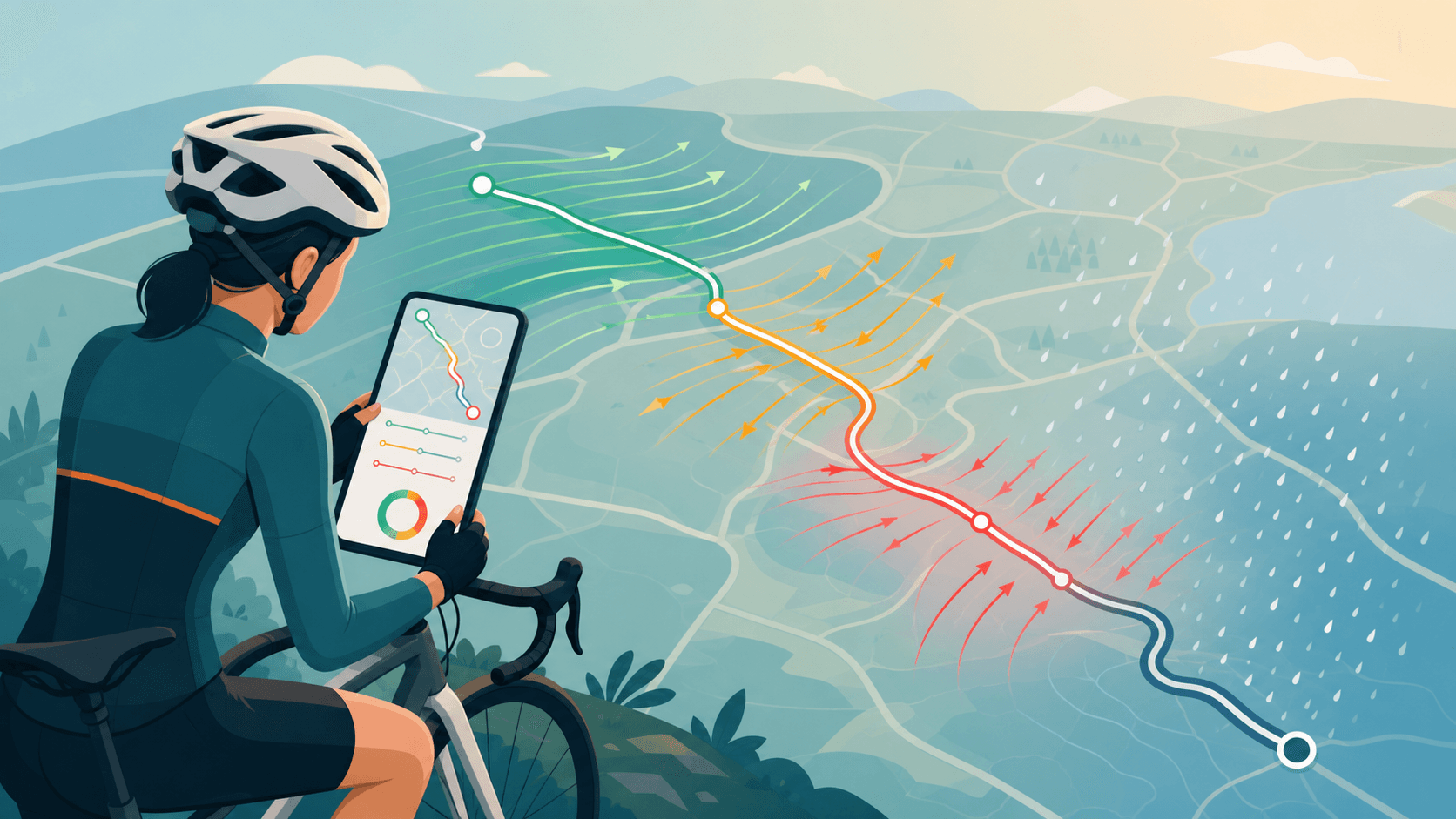
You've checked the forecast, chosen a familiar route, and set off, only for the whole ride to feel like grinding through treacle. The weather app said it was fine. So what went wrong?
You've checked the forecast, chosen a familiar route, and set off, only for the whole ride to feel like grinding through treacle. The weather app said it was fine. So what went wrong?
Wind. Specifically, the bit where it's blowing directly into your face for the first 20 kilometres.
A generic weather app tells you conditions at one point on the map. Your route travels across dozens of different segments, each facing a slightly different direction relative to the wind. That distinction matters enormously to how a ride actually feels, and it's the reason so many weekend windows get wasted on rides that could have been planned better.
Why weekend ride planning fails (and what wind has to do with it)
The same route can feel like two completely different rides depending on wind direction. On one Saturday you're flying; the following week you're suffering on the same roads with fresh legs. The only thing that changed was which way the wind was blowing relative to your route.
Generic weather apps and even some cycling-specific tools show you wind speed and direction at your location. What they don't tell you is whether that wind is pushing you along, hitting you side-on, or grinding you to a halt, and how that changes kilometre by kilometre across your actual route.
A truly smart cycling route planner doesn't just overlay a weather icon. It analyses every segment of your route against the wind direction, rolls in rain timing and temperature, and translates all of that into something you can act on immediately.
What to look for in a smart cycling route planner
If you're evaluating your options, here's what actually matters for weekend ride planning:
- Route-aware wind analysis. Headwind, tailwind and crosswind percentages for your specific route, not just local wind speed.
- Rain timing. Not just whether it will rain, but when during your ride window it'll arrive.
- Temperature and comfort. Useful for layering decisions, especially for early starts.
- Personalisation. A faster rider clears a route sooner than a casual one, scoring should reflect your pace, not an average.
- Departure-time planning. The best tool tells you not only which route to ride, but when to leave for the best conditions.
Tools like Strava, Komoot and Ride with GPS (listed by Cyclist.co.uk as key route apps in their February 2026 buying guide) handle building and navigating routes. Where they fall short is translating weather into a ride decision. That's the gap Tailwind GPS fills.
Tailwind Score: one number that answers "should I ride this route today?"
Tailwind GPS scores every route on a 0–100 scale for every departure hour. Here's what the ranges mean:
| Score | What it means |
|---|---|
| 80–100 | Excellent, favourable tailwinds for most of the ride |
| 55–79 | Great riding conditions |
| 40–54 | Neutral |
| 20–39 | Challenging |
| 0–19 | Expect a tough ride |
The score isn't calculated at your front door. Tailwind GPS analyses conditions along every kilometre of your route, sampling wind direction and speed, temperature, and precipitation segment by segment, hour by hour. Your position on the route at each point in time is factored in based on your riding pace. The result is a cycling wind forecast by route that's built around how you actually ride, not a hypothetical average cyclist.
You don't need to interpret wind charts or meteorology. The score does the work.
How Tailwind GPS works: from Strava or GPX to 'best time to leave'
Getting started takes a few minutes. Here's the basic setup:
- Connect your Strava account. Your existing routes import automatically. No rebuilding routes from scratch.
- Alternatively, upload a GPX file or draw a new route directly on the interactive route planner map using snap-to-road or freehand mode.
- Set your personalised parameters. Enter your average riding speed and preferred riding hours. This ensures scores reflect where you'll actually be on the route, not where an average rider might be.
- Browse departure times. Swipe through hours, compare scores, and identify your best window. A 7am departure might score 71; 9am might score 44. That alone can save a ride.
Weekend ride planning workflow: copy-and-follow steps
Here's the exact process to follow each Friday evening or Saturday morning:
Step 1: Choose your route. Select a saved route from your carousel (synced from Strava), or upload a GPX file for a new route. Free users can store up to 3 routes; subscribers can manage up to 60.
Step 2: Set your departure window. Decide whether you're riding Saturday or Sunday, and what time range works for you (morning, mid-morning, afternoon).
Step 3: Find the highest-scoring departure hour. Scroll through hourly scores for your chosen route. Look for the peak score within your available window. If Saturday scores 35 but Sunday morning shows 72, the choice is obvious.
Step 4: Sanity-check rain timing. Once you've spotted a strong-scoring hour, confirm rain isn't arriving mid-ride. Tailwind GPS shows precipitation along your route window so you can see if a shower lands at kilometre 30 or after you're home.
Step 5: Ride, then refine. After the ride, you'll have a better sense of whether the score matched reality. Adjust your speed settings if the forecast window felt off. Over a few weekends the personalisation sharpens up considerably.
Subscribers also get a weekly best-rides email covering the best upcoming windows across their saved routes, so you're not checking scores manually each day.
Headwind training mode: when you actually want the hard ride
Not every weekend ride needs to be comfortable. Sometimes the goal is fitness, not fun.
Tailwind GPS includes a Headwind Training mode that flips the logic. Instead of highlighting the most favourable departure times, it surfaces windows where you'll face sustained headwinds. That makes it useful for structured effort days without needing a coach or training plan. You can see exactly how to plan harder and easier days using the same tool, simply choosing the goal that fits the session.
The same planner, two different uses. Enjoyable weekend spin on Saturday; headwind intervals on Sunday.
Plan ahead: free tier vs subscriber
Tailwind GPS offers a genuinely useful free tier. Here's how the two plans compare:
Free (no card needed)
- Up to 3 saved routes
- 3-day forecast
- GPX import and export
- Strava integration
- Route sharing
- Interactive wind map
Subscriber ($2.99/month or $19.99/year)
- Up to 60 saved routes
- 14-day forecast window
- Weekly best-rides email highlighting your best upcoming opportunities
- 7-day free trial
For anyone who rides most weekends and wants to plan further ahead (or line up a cycling holiday), the 14-day window alone makes the subscriber tier worth it. At $19.99/year that's less than a single coffee a month.
FAQs
How accurate is route-specific wind and rain forecasting? All forecasts are model-based and carry inherent uncertainty, particularly beyond 48–72 hours. Tailwind GPS is transparent about this: the score is a planning aid, not a guarantee. Broadly speaking, shorter-range forecasts (today and tomorrow) are reliably actionable; the 7–14 day window is useful for spotting trends and planning ahead rather than committing to precise timings.
Do I need a power meter to use it? No. Personalisation uses your average riding speed and preferred riding hours. You don't need any special hardware.
Can I use GPX files? Yes. You can upload GPX files to import existing routes, and export GPX files to load onto a Garmin, Wahoo, or any other head unit. The best route planner options compared shows how this workflow stacks up against alternatives.
Does it work with Strava? Yes. Connect your Strava account and your saved routes import automatically. Scores are then calculated for each route individually.
Can I plan by departure time, not just route? Exactly. That's the core of the product. Every route receives an hourly score so you can compare 7am vs 9am vs 11am side by side and pick the window that works best.
What's the difference between Tailwind GPS and a normal weather app? A weather app tells you conditions at one location. Tailwind GPS analyses conditions along every segment of your route, accounts for your pace, and gives you a single score per departure hour. The question shifts from "what's the weather?" to "which ride will be great today?"
The best weekend ride planner is the one that tells you when to leave
Route planning tools for cyclists are genuinely good at helping you find roads to ride. Where most fall short is connecting the forecast to a concrete decision: which route, which day, and what time to leave.
That's the specific problem Tailwind GPS was built to solve. One score per route per hour, personalised to your pace, with rain timing and departure-time thinking built in from the start.
Start free with up to 3 routes and a 3-day forecast. If you want 14-day planning, a weekly best-rides email, and up to 60 routes, the subscriber plan is $2.99/month or $19.99/year, with a 7-day free trial. Sign up at tailwindgps.com and check what your regular weekend route scores this Saturday.
Try it now
Open the interactive wind map and find your best ride window — no sign-up required.

Free forever on 3 routes
Enjoyed that? Put it to work on your next ride.
- Every route scored for wind, rain and temperature
- The best hour to ride, up to 3 days out
- Strava routes in with one tap
Free forever on 3 routes. No card.
Related guides
How to Optimize FTP for Beginners
How to optimize FTP for beginners: what functional threshold power means, how to calculate it with a 20-minute test, and a simple plan to raise it.
·10 min read

Best FTP Wattage Calculator for Cyclists
Compare FTP and cycling wattage calculators, then use Tailwind GPS to turn your FTP into speed with wind, weight and gradient.
·6 min read
Best Road Cycling Routes in Copenhagen
Five Copenhagen road loops, from the flat Bryggebroen bridges to Strandvejen, plus how to turn one into an out-and-back and download the GPX.
·3 min read