
How to create a cycling route with AI (and check the wind before you ride)
Build a 20 to 150 km loop in a few taps with Tailwind GPS's free AI route creation, check its elevation and road types, then score it for the wind.
Tailwind GPS is a full route planner: draw, import or generate a route, check its elevation and road types, save it, ride it with turn-by-turn navigation or on your bike computer, and see the best day and hour to ride it. This guide covers the generating part. You'll build a 20 to 150 km loop with free AI route creation, tidy it up, save it, and compare the weather up to two weeks out.
You need a browser and nothing else. Tailwind GPS is web-based and built for phones, so there's no app to install, and the AI route workflow works on the free plan. Expect 5 to 10 minutes for your first route, plus a minute or two to compare days and hours.
Step 1: Open the map and pick the AI route tab
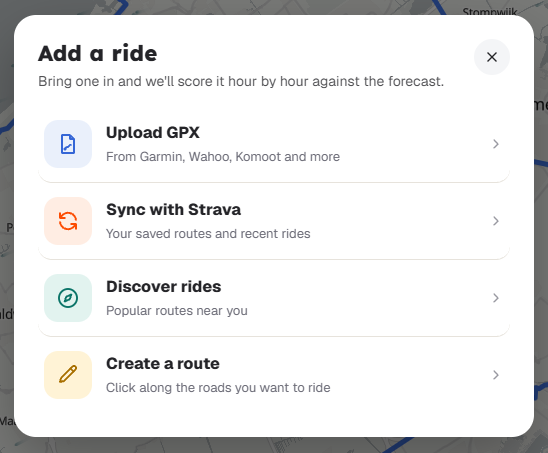
Open Tailwind GPS in your phone's browser and go to the map. Choose Add a ride, then Create a route, then pick the AI route tab. It's free for everyone, so you won't hit a paywall here.
Step 2: Tap your start point (and a second point if you want one)
Tap the map where you want to start. That's all you need.
You can also tap a second point. It does one of two jobs: it sets the direction you'd like the loop to head out towards, or it marks where you want to finish. Use it if you already know you want to ride towards the coast, say, or end at a café in the next town.
Step 3: Set your distance and press Generate
Drag the distance slider to your target, anywhere from 20 to 150 km. Then press Generate.
The AI favours quiet, popular road-bike roads. It doesn't plan around the wind, so treat the result as a solid starting loop and use Step 7 to find the day and hour that suit it.
Step 4: Drag the route into shape before you save
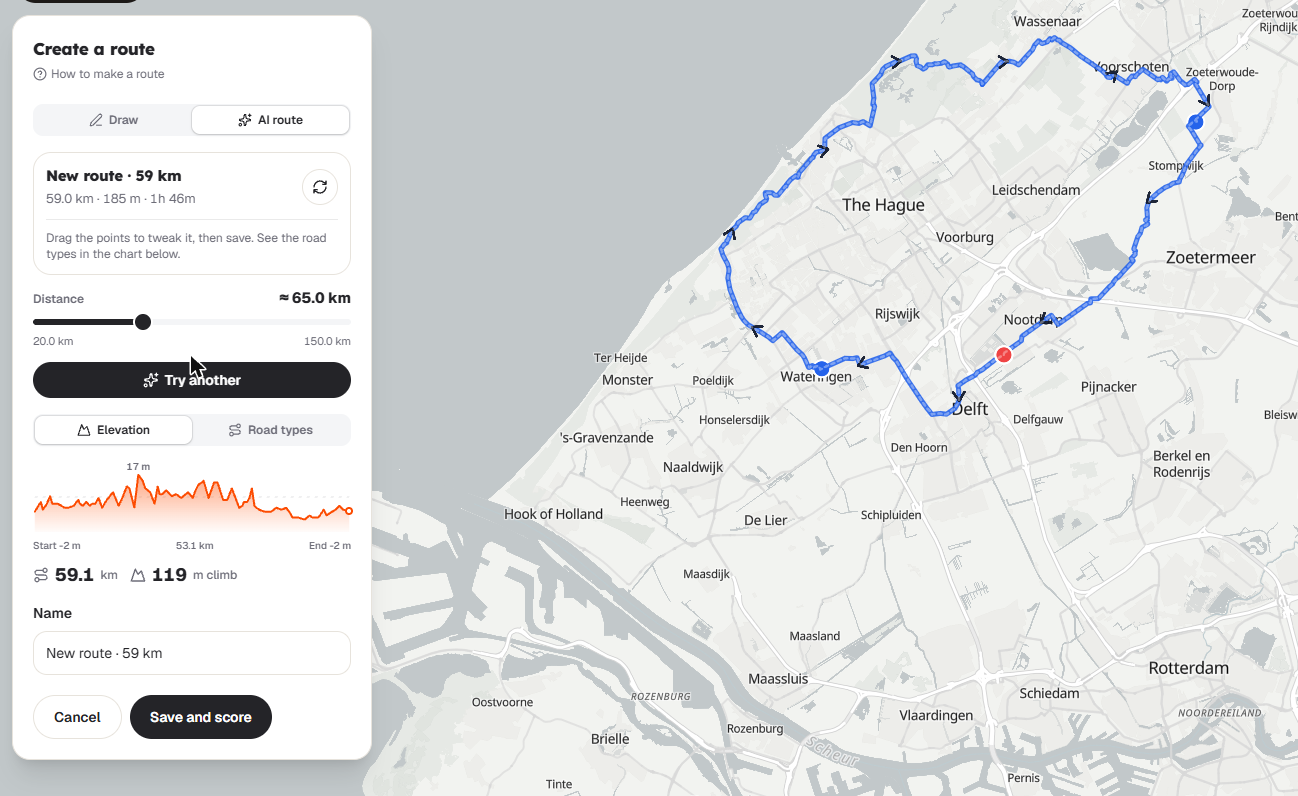
Your route opens in the editor, and it isn't saved yet. That's useful, because you can change it freely first.
Drag the line to adjust it. Typical fixes include:
- Moving the line away from a junction you'd rather avoid.
- Reshaping the loop slightly so it stays on roads you know and like.
If you'd like to draw sections by hand, Tailwind's free route builder lets you snap to cycling roads or draw freehand, with distance and elevation updating as you go.
Checkpoint: does the distance still match what you wanted? Do the elevation numbers look sensible? If yes, carry on.
Step 5: Check the Elevation and Road types charts
Beside the route you'll see two charts. Read both before you save.
- Open the Elevation chart. Look for climbs steeper or longer than you fancy, especially late in the ride.
- Open the Road types chart. Look for too much of a road type you'd rather avoid.
If something's off, drag the route to fix it and glance at the charts again.
Warning: don't skip this. The version you save is the version Tailwind scores for wind, so any change you make after saving means checking the scores again.
Step 6: Press Save
Press Save. Until you do, the route only exists in the editor. Once it's saved, you can score it, export it and share it.
On the free plan, Tailwind GPS tracks up to 3 routes, so choose the ones you really mean to ride.
Step 7: Find the best day and hour
This is where the weather comes in.
Open the saved route's departure-hour view. Tailwind samples the forecast wind, rain and temperature along the whole line at your pace, then gives the route a Tailwind Score from 0 to 100 for every hour you might leave. The same loop can score very differently at 8am and 2pm, or on Saturday and Sunday.
| Score | What it means |
|---|---|
| 80 to 100 | Excellent |
| 55 to 79 | Great |
| 40 to 54 | Neutral |
| 20 to 39 | Challenging |
| 0 to 19 | Tough |
The free plan shows 3 days ahead. Pro shows 14 days ahead, which helps if you're planning a weekend ride midweek or lining up a bigger day further out. For more on why wind angle relative to your route matters more than the headline forecast, see this explainer on the best wind direction for cycling.
Checkpoint: pick the hour with the best score that you can actually make. A 90 at 6am is no use if you won't be out of the door until 9. A 75 at a time that suits you is often the better call.
Step 8 (Pro only): Optimise the route for your chosen hour
On Pro, route optimisation (beta) can take your saved route and swap headwind sections for better roads for the hour you've chosen.
Choose your departure hour first, then run optimisation. It's built around that one hour, so if you change your start time afterwards, the result may no longer fit. Because it's a beta, check the new route's charts and score before you rely on it.
Pro is free for 30 days, then $3.99 a month or $24.99 a year, and it includes 60 tracked routes.
If your route feels off
- Scores are poor at every hour: change the shape of the loop. Drag it so the long outbound leg points differently, then save and check again. Hunting for a better start time won't fix a loop that's stuck facing the wind.
- Distance is a bit out: adjust the line in the editor and check the distance and elevation before saving.
- Road types aren't what you wanted: tweak the line, save, and recheck the wind score.
- You want to plan beyond 3 days: that needs Pro, which looks 14 days ahead.
Your loop is saved and scored: now choose your start time
You've generated a loop with AI, tweaked it, checked elevation and road types, saved it, and compared the Tailwind Score by departure hour. Pick your slot and go.
If you ride with a bike computer, export the route as a GPX file. If you're riding with friends, share a link or run a Ride Huddle. And if you'd rather ride with directions on your phone, there's turn-by-turn navigation in the browser.
Ready to try it? Open the map and generate your first route free.

Free forever on 3 routes
Enjoyed that? Put it to work on your next ride.
- Every route scored for wind, rain and temperature
- The best hour to ride, up to 3 days out
- Import routes from Strava
Free forever on 3 routes.
Related guides
How to read your cycling route forecast: wind, gusts, hills and rain
Read average wind, gusts, elevation and rain together, and how Tailwind GPS's 0 to 100 score pulls them into one answer for each departure hour.
·5 min read
Route optimisation for cyclists: dodge the headwind on a route you already love
How Tailwind GPS's route optimisation (Pro, beta) finds headwind stretches for your departure time and suggests faster roads or riding the loop the other way.
·4 min read
Tailwind GPS vs RideByWeather: which wind-aware cycling planner is right for you?
Tailwind GPS and RideByWeather compared: hour-by-hour route scoring, gusts, rain, elevation, AI route creation, route optimisation, navigation, groups and pricing, with where each one is ahead.
·5 min read