
How to read your cycling route forecast: wind, gusts, hills and rain
Read average wind, gusts, elevation and rain together, and how Tailwind GPS's 0 to 100 score pulls them into one answer for each departure hour.
A forecast for your postcode tells you about the wind outside your front door. It doesn't tell you what you'll ride into at mile 20. Tailwind GPS is a route planner that forecasts each of your routes up to two weeks ahead, so you can see the weather where you'll actually be riding. This guide shows you how to read it: average wind, gusts, direction against your route, hills and rain, then one decision about when to ride.
Who it's for: regular riders with limited time who want fewer "where did that headwind come from?" rides. You'll need: a saved route or GPX file in Tailwind GPS, and your average riding speed set as your pace. Difficulty and time: easy. About 5 to 10 minutes once you know where to look.
Step 1: separate average wind from gusts
Find the average wind and the gust figure on your route forecast. They're different measurements. Wind varies from moment to moment. The average is the steady background push or drag, and a gust is a brief peak above it.
For you, that means average wind is the steady background push or drag. Gusts are short spikes that feel much harsher than the average suggests.
Quick check: if the gusts sit well above the average, treat the ride as gusty, even if the average looks fine.
Checkpoint: can you name one or two sections where gusts would be most annoying? Think bridges, open stretches and exposed hills.
Step 2: read wind direction against your route
Wind direction is generally reported as the direction the wind blows from. A northerly blows from the north towards the south. So when you read wind arrows on a forecast, work out where the wind is coming from, then compare it with the way you're heading.
- Headwind: the wind comes from ahead of you. It slows you down and costs effort.
- Tailwind: the wind comes from behind. It carries you along.
- Crosswind: the wind hits your side. It affects steering stability more than it slows you directly.
The same 15 mph wind can be a gift or a grind depending on your heading. On an out-and-back route, a headwind out usually means a tailwind home. That's why direction against your route matters more than speed alone. Our guide to the best wind direction for cycling goes further on wind angles.
In Tailwind GPS the route line is coloured by the wind: green for a tailwind, yellow for a crosswind and red for a headwind. The strip beside the map shows the same split across the time you'd be riding.
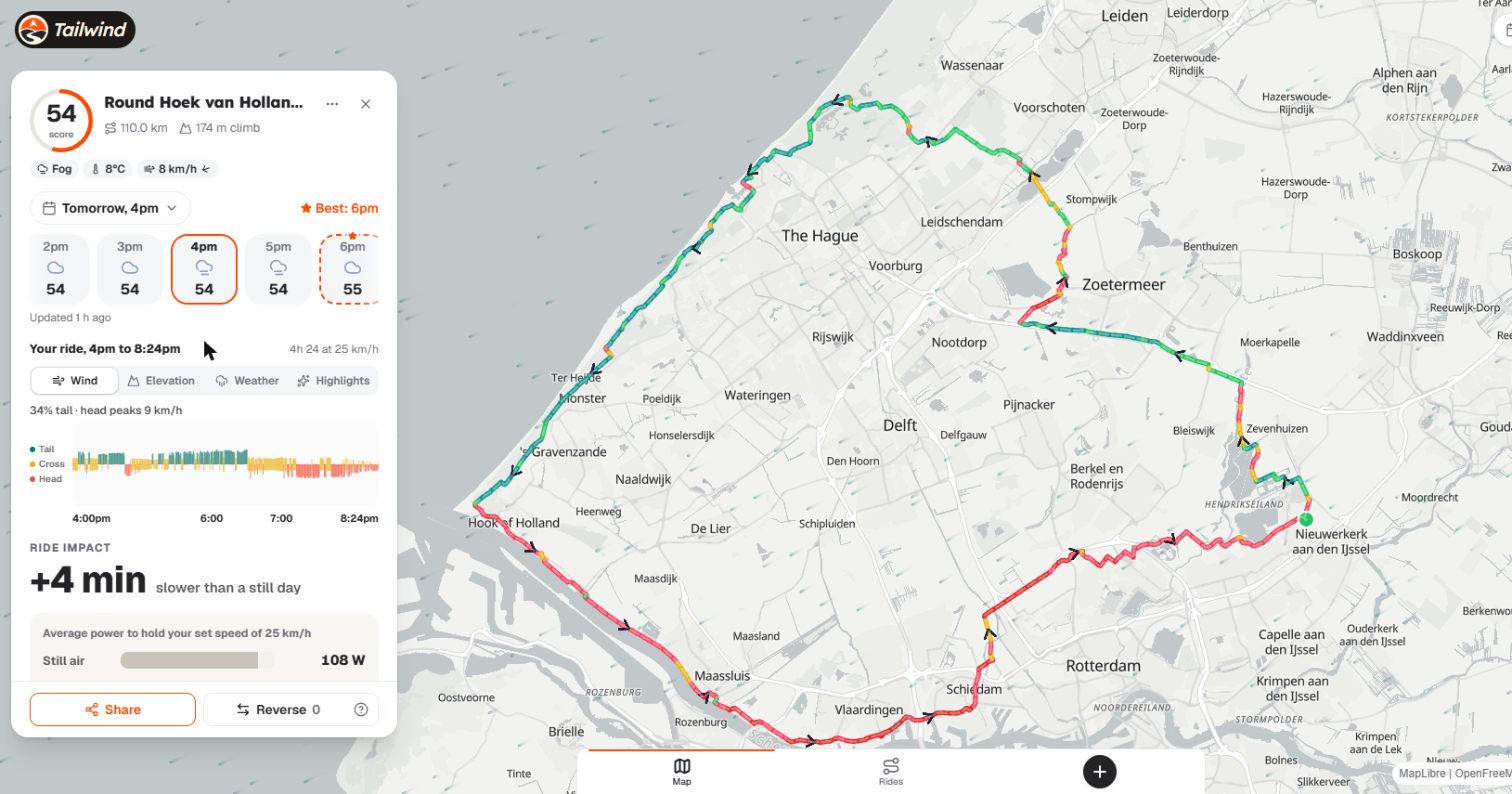
Checkpoint: for your chosen hour, does the forecast mean more time into headwinds or more time with the wind behind you?
Step 3: judge how gusts will feel on your route
Don't hunt for a magic gust cut-off. Look at the pattern along your route timeline instead. Gusts matter because they cause sudden pushes and twitches, and the risk shows up where roads are exposed, especially in crosswinds.
Tailwind GPS shows the strongest forecast gust along the ride when it's worth knowing about, so a nasty spike doesn't hide behind a calm-looking average. It sits beside the score rather than inside it, so weigh it up yourself.
Checkpoint: if gusts are unavoidable, pick the hour where they land in the part of the ride you handle best. That's often the early miles, when you're fresher.
Step 4: use the Elevation chart to see where hills meet the wind
Open the Elevation chart for your route. Hills change how a headwind feels because climbing keeps you slower and steadier, so you spend longer in the wind.
Look for the biggest climbs, then check whether they fall on a headwind-facing section. A long climb into the wind is hard work. The same climb with the wind behind you is a very different afternoon.
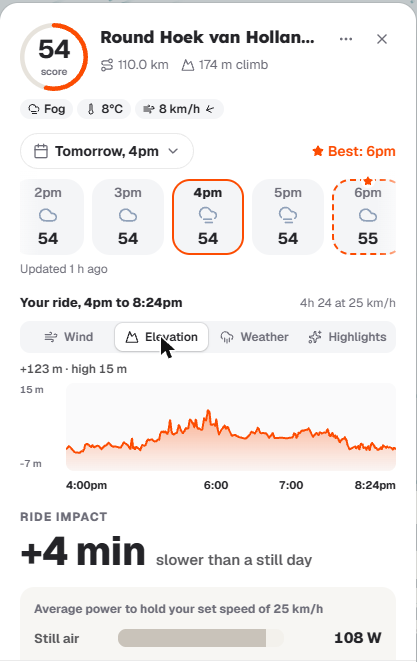
Checkpoint: can you say out loud whether your hardest climb lines up with the worst wind direction?
Step 5: check when the rain arrives, not just the chance of it
A single "20% chance of rain" tells you little. What matters is when rain overlaps your ride: at the start, mid-ride or near the finish. Wet roads and poor visibility change comfort and risk, and a shower in the last ten minutes is nothing like one at the far end of a loop. Tailwind GPS shows weather along your route, so you can see rain where you'll actually be riding.
Checkpoint: choose the hour where rain misses you, or lands on a part you can handle.
Step 6: pick the day, then the hour
Start with the days. Scan the week or two ahead for the best-scoring day, then drill into the hours. Leaving an hour earlier can change wind, gusts and rain timing a lot. Swipe through a few departure hours and look at the best Tailwind Score first.
Checkpoint: note the top one or two hours you'd seriously consider.
How the Tailwind Score pulls it together
Tailwind GPS gives every route a Tailwind Score from 0 to 100 for every departure hour:
| Score | Rating |
|---|---|
| 80 to 100 | Excellent |
| 55 to 79 | Great |
| 40 to 54 | Neutral |
| 20 to 39 | Challenging |
| 0 to 19 | Tough |
The score reads the wind at the time you'd be at each point on your route, based on your pace. That's why your pace setting matters: a quicker rider reaches the far side of a loop sooner and meets different wind there. Wind speed and direction, rain and temperature feed one answer to a simple question: should you ride this route at this hour? Gusts are shown beside the score.
Below the score, the Ride impact panel turns the wind into minutes and watts: how much slower the ride is than on a still day, and how much it adds to the effort on tailwind, crosswind and headwind sections.
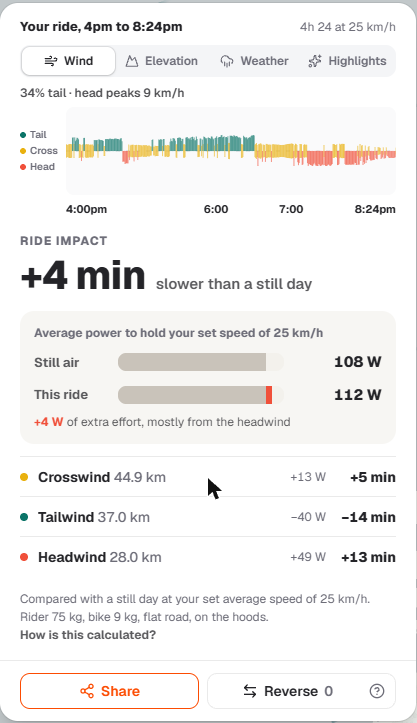
The score is built around wind first, so keep checking hills and rain yourself using Steps 4 and 5. Because it's calculated for your specific route and pace, it's a better guide than a general forecast for your area.
Worked example: a loop, three start times, seven minutes
Say you've got a loop and your pace is set. Compare 07:30, 08:30 and 09:30.
- Skim the scores. Say 07:30 shows "great", 08:30 "neutral" and 09:30 "challenging". Start with 07:30.
- Check the wind and gusts. Find the worst stretch for that hour. Is it an exposed section or a crosswind?
- Open the Elevation chart. Do the climbs fall into the headwind part?
- Check rain timing. Know when, or whether, you'll ride through it.
- Decide. A great score, gusts early and no rain overlap is a go. If it's neutral or worse and the climbs sit in the headwind, try an hour earlier or later before you cancel.
Common mistakes and how to fix them
- Reading wind speed without direction. Check which legs are headwind and which are tailwind.
- Assuming the average covers gusts. Look at gusts on exposed sections.
- Stopping at the day. Once you've found a good day, swipe through its departure hours.
- Ignoring hills. Use the Elevation chart to see where headwind drag lasts longest.
- Trusting rain probability alone. Check when rain overlaps your ride.
Stuck? If the scores look odd, check your pace setting first. A pace that's too slow or too fast shifts where you'll be at each hour.
What you can do now
You can now read average wind against gusts, turn wind direction into headwind, tailwind or crosswind for your route, see how climbs sit in the wind, check rain timing, and pick a departure hour with the Tailwind Score. If a score is neutral or challenging, shift your start by an hour before you abandon the ride.
Next, open your usual route and check its Tailwind Score on Tailwind GPS for your normal departure options. Then commit to the best hour.

Free forever on 3 routes
Enjoyed that? Put it to work on your next ride.
- Every route scored for wind, rain and temperature
- The best hour to ride, up to 3 days out
- Import routes from Strava
Free forever on 3 routes.
Related guides
How to create a cycling route with AI (and check the wind before you ride)
Build a 20 to 150 km loop in a few taps with Tailwind GPS's free AI route creation, check its elevation and road types, then score it for the wind.
·4 min read
Route optimisation for cyclists: dodge the headwind on a route you already love
How Tailwind GPS's route optimisation (Pro, beta) finds headwind stretches for your departure time and suggests faster roads or riding the loop the other way.
·4 min read
Tailwind GPS vs RideByWeather: which wind-aware cycling planner is right for you?
Tailwind GPS and RideByWeather compared: hour-by-hour route scoring, gusts, rain, elevation, AI route creation, route optimisation, navigation, groups and pricing, with where each one is ahead.
·5 min read