
Route optimisation for cyclists: dodge the headwind on a route you already love
How Tailwind GPS's route optimisation (Pro, beta) finds headwind stretches for your departure time and suggests faster roads or riding the loop the other way.

Tailwind GPS is a full route planner with the weather built in. You build or import routes, see how each one scores for every day and hour up to two weeks ahead, and pick the best slot. Route optimisation (Pro, beta) is the next step: when a route you love has a bad stretch at your chosen time, it reworks that stretch, or flips the loop, so you can still ride it.
You'll need a saved ride in Tailwind GPS and a departure time you're willing to plan around. Allow about five minutes. There's nothing technical involved, just a few decisions you make by looking at the screen.
When route optimisation helps, and when to leave your ride alone
Optimisation suits a route that's usually good but has one bad hour: a familiar stretch that turns into a slog when the wind comes from the wrong side.
It won't suit every ride. If you chose your route for a cafe stop, a particular climb or a club run, the route is the point, and changing it defeats the purpose. Skip optimisation for those rides.
Route optimisation is a Pro feature and still in beta. Pro is free for 30 days, so you can try it on a real ride before deciding anything.
Step 1: Choose a ride that's saved in Tailwind GPS
Open Tailwind GPS and pick a route you already like. If it isn't there yet, import it from Strava or upload a GPX file, or draw it on the map. Only saved routes get scored for departure hours.
Checkpoint: you can see your route on the map along with its departure-hour scores. If the scores are missing, check the route has actually been saved.
Step 2: Pick the hour you'll really be on the road
Choose the departure time you plan to ride, not the time you wish you could ride.
This matters because of how Tailwind works. It estimates when you'd reach each part of the ride at your pace, then reads the wind for that hour at that point. The first ten kilometres and the last ten kilometres can be in very different conditions, even on a loop that's only a couple of hours long.
Every saved route gets a Tailwind Score from 0 to 100 for each departure hour. Wind, rain and temperature are sampled along the whole line, not just at your front door. So the question the score answers is simple: how favourable will the weather be if I start this route at this time?
Checkpoint: you've selected one departure hour and can see its score.
Step 3: Run route optimisation
With Tailwind Pro (beta), open the ride's menu and choose Optimise route. It runs for the departure time shown on the map.
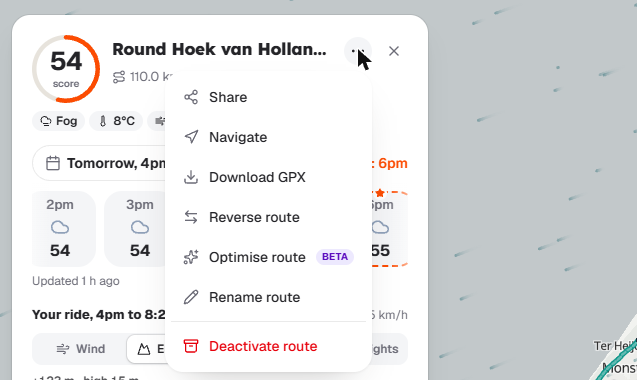
Behind the scenes, Tailwind finds the stretches that run into the wind at the hour you'd be there. It then looks for alternative roads for just those sections. Everything else stays as you drew it, so the ride remains recognisable.
Checkpoint: the screen shows proposed changes that you can accept or dismiss. Nothing changes until you choose.
Step 4: Read the numbers before you accept anything
Look for two figures on each suggestion:
- The minutes of headwind riding avoided.
- Any extra distance the change adds.
Tailwind checks that a change is really quicker before it suggests it, so you're weighing up headwind minutes against distance, not worrying that you'll end up with a worse option.
You may see one of two kinds of change. The first is faster roads swapped in for the headwind stretches. The second is sometimes the best answer of all: riding the loop the other way round, which keeps the same distance. Tailwind tells you when it's recommending that.
Checkpoint: you can point to the headwind minutes avoided and the extra distance (if there is any) for the suggestion on screen.
Step 5: Keep it, take the road tweaks, or flip the direction
You've got three outcomes.
- The ride is already good for that hour. Tailwind says so and changes nothing. That's a useful result: you can leave at that time knowing the best change it found wouldn't raise your score.
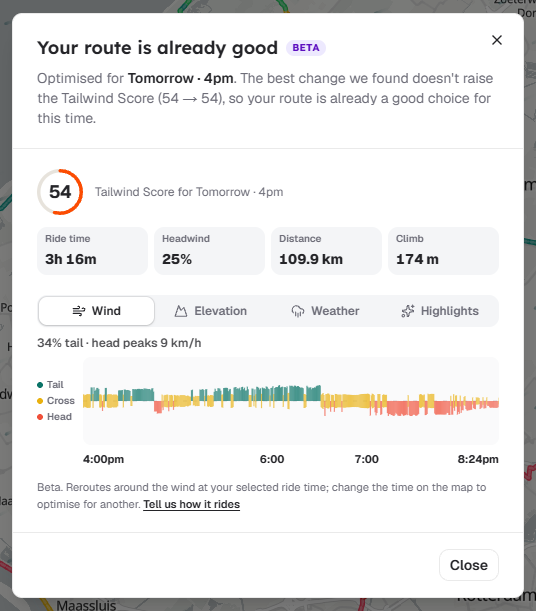
- Road tweaks are suggested. Look only at the headwind stretches that would change. Is the trade-off between minutes avoided and extra distance worth it to you?
- A reversed loop is suggested. The distance stays the same, so the question is whether you're happy riding your favourite loop in the other direction.
Checkpoint: you've chosen one option, and the resulting route still looks like your loop.
Step 6: Check the plan, then get it on your device
Before you head out, scan the final route once. Are the changes small enough that the ride still feels like yours? If not, dismiss them and go with the original.
If you use a GPS computer, export the updated route as a GPX file, or navigate in your browser, and check the new version is the one on your device. It's easy to ride the old file by mistake.
Checkpoint: you have your final route and your departure hour, and your device has the same route.
Troubleshooting: when optimisation feels wrong
Tailwind suggested a change you don't want. Dismiss it. If the ride is built around a cafe stop, a climb or a club run, leave it alone. The same goes for any route where the exact roads matter more than the wind.
Nothing changed. That usually means the ride is already good for that hour. It isn't a fault.
The change adds too much distance. Dismiss it and try a different departure hour within the window you have free. Compare what's on screen for each hour, and pick the one where the numbers suit you.
Still not right? Check three things:
- Did you pick the right saved route?
- Did you select the hour you'll genuinely leave?
- Are you reading the minutes avoided and the extra distance the right way round?
Also remember the free plan gives you a 3-day forecast window and 3 saved routes. Pro extends the forecast to 14 days, which gives you more hours to compare.
What you've done, and what to try next
You picked a saved ride and a departure hour, ran Tailwind Pro (beta) optimisation, and checked the minutes of headwind avoided against any extra distance. Then you kept only the changes that keep the ride recognisable.
Next time, try the same route on a different day or hour and see how the score moves. Save one weekday loop and one weekend loop so you've always got a good option for the week ahead. For a better grasp of wind angles, read the guide on the best wind direction for cycling.
Ready to try it? Start the free 30-day Pro trial and optimise one of your saved rides.

Free forever on 3 routes
Enjoyed that? Put it to work on your next ride.
- Every route scored for wind, rain and temperature
- The best hour to ride, up to 3 days out
- Import routes from Strava
Free forever on 3 routes.
Related guides

How to create a cycling route with AI (and check the wind before you ride)
Build a 20 to 150 km loop in a few taps with Tailwind GPS's free AI route creation, check its elevation and road types, then score it for the wind.
·4 min read
How to read your cycling route forecast: wind, gusts, hills and rain
Read average wind, gusts, elevation and rain together, and how Tailwind GPS's 0 to 100 score pulls them into one answer for each departure hour.
·5 min read

Tailwind GPS vs RideByWeather: which wind-aware cycling planner is right for you?
Tailwind GPS and RideByWeather compared: hour-by-hour route scoring, gusts, rain, elevation, AI route creation, route optimisation, navigation, groups and pricing, with where each one is ahead.
·5 min read