Tailwind GPS vs Headwind app: cycling wind planning compared (2026)
Tailwind GPS vs Headwind app for cycling wind planning, compare scores, planning horizons, and departure-time tools. See which app fits your riding style.

You've checked the generic weather app, seen "south-westerly 18 km/h", shrugged, and headed out. Twenty minutes later you're grinding into a headwind that the forecast never mentioned. Both Tailwind GPS and Headwind exist to solve exactly that problem, but they go about it in meaningfully different ways.
Quick answer: which app should you choose for wind planning?
If you want a visual heatmap showing how hard a familiar commute will feel over the next seven days, Headwind is a solid, focused tool. If you want to know when to leave and which of your saved routes will score highest across the next 14 days, Tailwind GPS is built for that.
Here's the simplest decision tree:
- Commute or day-to-day difficulty check, Headwind's 1–5 difficulty score and wind heatmap get the job done quickly.
- Planning the best departure hour, comparing multiple saved routes, or booking a long ride window two weeks out, Tailwind GPS's hourly Tailwind Score (0–100) and 14-day planning window are the stronger fit.
The rest of this article walks through exactly why.
What both apps get right (and why wind is so hard to judge)
Generic weather apps report conditions at a point, usually somewhere near your postcode or the nearest weather station. That tells you the wind speed and direction in general, but not whether you'll be riding into it, away from it, or across it for your specific route.
A south-westerly at 20 km/h can mean a glorious tailwind, a brutal headwind, or an awkward crosswind depending entirely on which direction your loop runs. Two cyclists leaving from the same street but riding different routes will have completely different experiences from the same forecast.
Route-specific wind forecasting solves this by mapping the wind against each segment of your actual route, accounting for your direction of travel at every point. Both Headwind and Tailwind GPS start from this premise. Their outputs and workflows diverge from there.
Headwind app: how it works for cycling wind planning
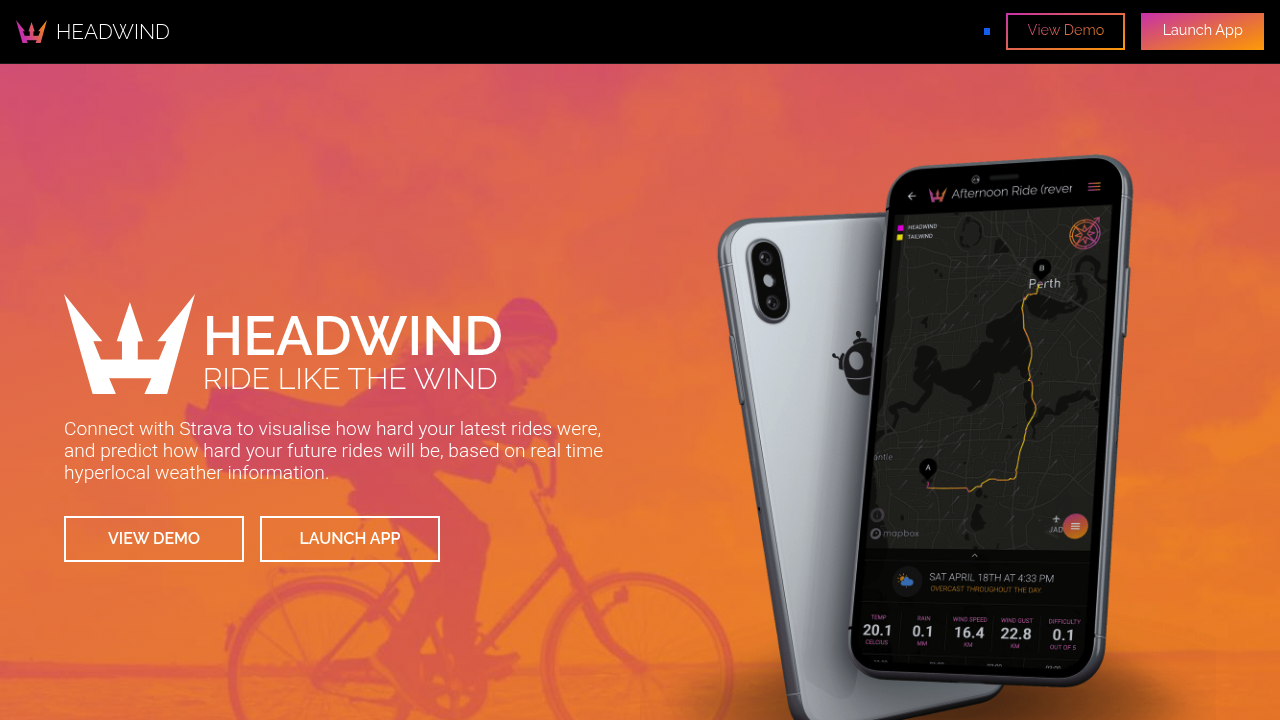
Headwind connects to Strava and pulls in your rides and saved routes. From there, the core workflow is visual. The route is coloured as a heatmap based on whether you're headed into the wind or away from it at each segment, giving you an immediate read on where the hard sections fall.
For its difficulty score, Headwind describes the approach on its landing page: "Headwind grabs the latest weather information for the exact latitude and longitude of the start of your ride and then uses that information, coupled with the data from Strava to give you a difficulty score out of 5 for the ride." That 1–5 score is the primary output. It's clean and easy to interpret at a glance.
The forecast view lets you scroll forward: you can "predict how hard your ride will be up to 7 days into the future", which covers a standard working week of commute planning comfortably.
Headwind also accounts for wind resistance in calorie estimates, so if you're curious how much harder a headwind session is making your commute in energy terms, it reflects that. On top of the wind heatmap, it uses RainViewer to overlay current rain radar directly on your ride, which is handy for real-time decisions.
In short, Headwind answers: how hard will this ride be? It does that well, especially for recurring commute routes where you want a quick daily difficulty check.
Pricing for Headwind isn't prominently listed on the landing page, so check headwindapp.com or the relevant app store listing for current plan details before signing up.
Tailwind GPS: how your Tailwind Score and departure-time planning works
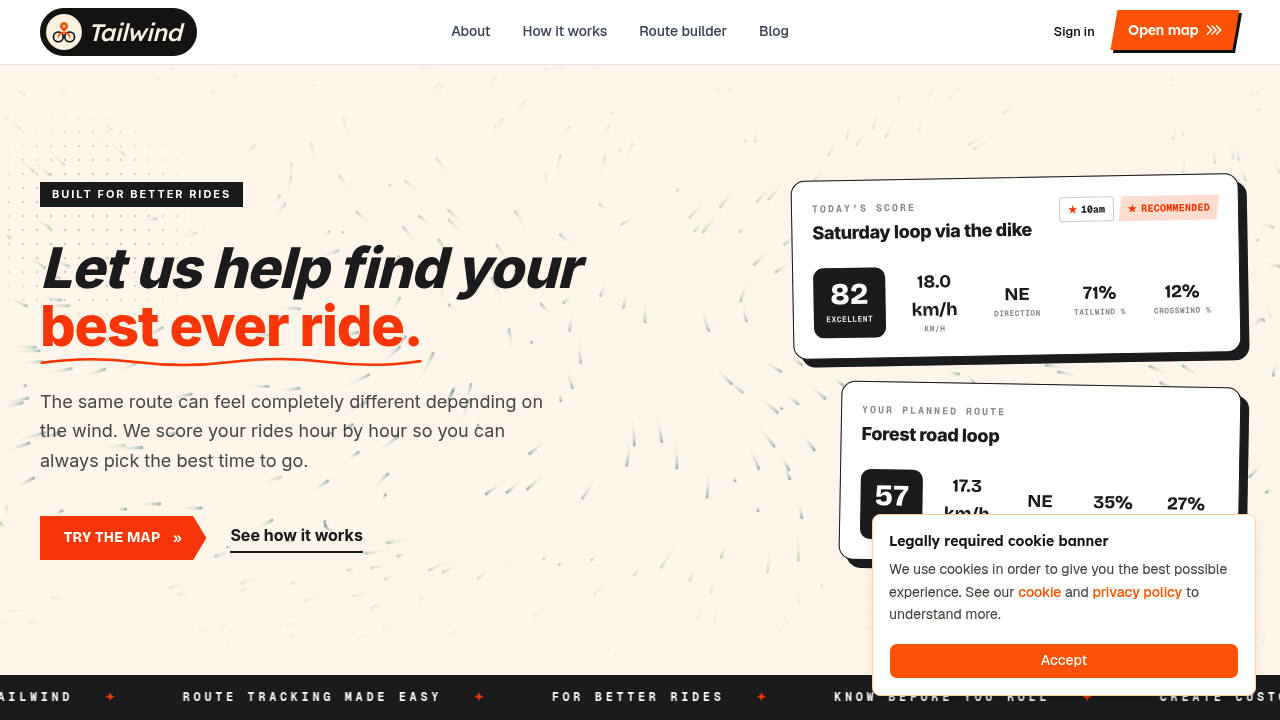
Tailwind GPS approaches the problem from a different angle. The core output isn't "how hard is this ride right now?" It's "which hour today (or this week, or this month) gives me the best conditions for this specific route?"
Every route gets a Tailwind Score (0–100) for every departure hour. The scale works like this:
- 80–100, Excellent. Favourable tailwinds for most of the ride.
- 55–79, Great conditions.
- 40–54, Neutral.
- 20–39, Challenging.
- 0–19, Expect a tough ride.
That score isn't based on conditions at your front door. Tailwind GPS analyses wind, temperature, and rain along the entire route, sampling each segment hour by hour and weighting results by your riding speed, so the forecast reflects where you'll actually be on the route at any given moment rather than where an average rider might be.
The planning horizon is a meaningful practical difference. Free users get three days ahead, which covers most short-notice decisions. Subscribers unlock a full 14-day wind forecast for cycling routes, which is particularly useful for planning weekend rides, lining up a sportive or gran fondo attempt, or choosing which day of a holiday has the best riding window.
Beyond the score, the supporting workflow is built around everyday planning decisions:
- Strava sync pulls your saved routes in automatically, no rebuilding required.
- GPX import/export and route drawing let you add routes that aren't in Strava yet.
- Departure-time carousel lets you swipe through hours to compare scores side by side.
- Route-specific email alerts notify you when a favourite route hits your chosen score threshold (subscriber).
- Weekly ride summaries highlight the best upcoming windows across all your saved routes.
- Headwind Training mode does the inverse, deliberately surfacing rides with sustained headwinds when you want to train effectively in headwinds and build strength.
- Interactive wind map with animated wind particles so you can see conditions across the entire map before committing to a route.
Tailwind GPS is available free in any browser with no app download required. The subscriber plan is $2.99/month or $19.99/year, with a 7-day free trial.
Side-by-side comparison: Tailwind GPS vs Headwind app
| Feature | Tailwind GPS | Headwind |
|---|---|---|
| Score style | 0–100 Tailwind Score | 1–5 difficulty rating |
| What it answers | When should I leave? Which route scores best? | How hard will this ride be? |
| Planning window | 14 days (subscriber), 3 days (free) | Up to 7 days |
| Departure-hour scoring | Yes, every hour across the forecast window | No, difficulty is shown per day/time |
| Strava integration | Yes | Yes |
| Route workflow | Save routes + score by hour; GPX import/export; route drawing | Strava heatmap visualisation |
| Rain overlay | Rain probability along route | RainViewer radar overlay |
| Email alerts | Yes (subscriber) | Not confirmed on landing page |
| Weekly ride summaries | Yes (subscriber) | Not listed |
| Headwind training mode | Yes | No |
| Free tier | 3 routes, 3-day forecast | Check headwindapp.com |
| Subscriber pricing | $2.99/mo or $19.99/yr | Check headwindapp.com |
The decisive column is the "what it answers" row. Headwind is optimised for visualising difficulty. Tailwind GPS is optimised for choosing the best departure window, which is a different (and for most cyclists, more actionable) question.
Accuracy: how much should you trust either app?
Any route-specific wind app is only as good as the underlying forecast data, and all forecasts carry uncertainty, especially beyond 3–4 days. Neither app can eliminate that reality, so it's worth calibrating expectations sensibly.
A practical way to test either tool: ride a few routes across different wind days, note the predicted score or difficulty beforehand, then compare it to how the ride actually felt. Over 10–15 rides you'll build a clear sense of how the score maps to your perceived effort and average speed.
A few things worth knowing about forecast accuracy in general:
- Short-range forecasts (1–2 days ahead) are substantially more reliable than 7- or 14-day ones. Use long-range scores to identify promising windows to watch, then confirm closer to the time.
- The advantage of departure-time optimisation is that even if a forecast is slightly off, you're still comparing relative conditions across hours on the same day, which tends to give useful signal even under imperfect data.
- Hyperlocal data (weather sampled at the actual coordinates of your route rather than a nearby station) narrows one common source of error. Both apps use location-specific inputs, which helps.
The honest summary: trust short-range scores confidently, use longer-range forecasts directionally, and do a quick same-day check before you head out.
Which app suits your riding style? Three scenarios
Weekday commute
You ride the same route most mornings and you want a quick answer: will Tuesday or Thursday be easier this week? Headwind's seven-day forecast view and 1–5 difficulty score gives you that at a glance. The commute use case is exactly what Headwind is designed for, and it does it cleanly.
That said, if you ride multiple route options (say, the direct road vs the quieter back route), comparing saved routes by departure hour is where Tailwind GPS starts to add more value.
Weekend long ride or personal best attempt
You want to know not just whether Saturday looks ok, but whether Saturday at 7am, 8am, or 9am gives the best window, and whether next weekend's conditions look even better. Headwind's seven-day horizon won't show you a fortnight out, and it doesn't give you departure-hour scoring.
Tailwind GPS was built for this scenario. Swipe through your saved routes, compare hourly scores across the next 14 days, and let the alerts tell you when your favourite loop hits a score of 80 or above. For anyone chasing a personal best or planning a big ride, that planning confidence is the main reason to use it.
Club rides and group logistics
Organising a group ride means finding a window that works for multiple routes and multiple schedule constraints. Tailwind GPS's route sharing (share a link to your scored route), combined with departure-time comparisons and the best departure time for a group ride feature, makes it easier to present options to the group in a format everyone can act on. Headwind's heatmap is useful for a single rider's commute check, but less practical for coordinating group decisions.
FAQ
Is Headwind free?
Headwind's pricing wasn't detailed on the landing page at the time of writing. Visit headwindapp.com or check the relevant app store listing for the most current free vs paid plan details.
Does Headwind integrate with Strava?
Yes. Headwind's core workflow is built around Strava, pulling in your rides and routes to generate heatmaps and difficulty scores.
How far ahead can you plan with Headwind?
Headwind's site states you can predict how hard your ride will be "up to 7 days into the future."
How far ahead can you plan with Tailwind GPS?
Free users get a 3-day forecast window. Subscribers unlock 14-day forecasts, a 7-day free trial is included so you can test the full planning window before committing.
Do both apps help with headwinds and tailwinds, not just generic wind direction?
Yes, both apps account for wind direction relative to your route. Headwind colours route segments by whether you're heading into or away from the wind. Tailwind GPS calculates tailwind, headwind, and crosswind percentages for each segment of your route and rolls them into a single 0–100 score per departure hour.
Do they work with saved routes, or do you need to re-draw?
Both apps connect to Strava, so your existing Strava routes load automatically without rebuilding. Tailwind GPS also supports GPX import, freehand route drawing on the map, and route export, giving you more flexibility for routes that aren't already in Strava.
Which one is better for deciding when to leave?
Tailwind GPS. It's the only one of the two that produces a score for every departure hour across the forecast window, so you can directly compare 7am vs 9am on Sunday, or this weekend vs next. Headwind shows difficulty at a given time but isn't designed around departure-time optimisation in the same way.
Bottom line
Headwind is a well-made tool for a specific job: connect Strava, see how hard your commute or familiar route will feel, check a wind heatmap, and move on. For commuters who want a quick daily difficulty check, it does that efficiently.
Tailwind GPS solves a broader planning problem. The 0–100 Tailwind Score answers a different question: not "how hard will this be?" but "when should I leave, and which route will feel best?" Add the 14-day planning window, departure-hour scoring, route-specific alerts, and weekly ride summaries, and you have a tool designed for cyclists who want to make every available riding hour count.
If that sounds like you, Tailwind GPS is free to try with no app download needed. Connect Strava, see your routes scored by the hour, and find your best ever ride.
Try it now
Compare departure-hour Tailwind Scores across your Strava routes and pick the best window to ride.
Related posts

Introducing Ride Huddles: a simple way to choose your next group ride
Ride Huddle is a simple way for groups to choose a route together. Create a Huddle, add your routes, share one link, and let everyone vote — free, with no account required.
·2 min read
How to navigate a cycling route without getting lost
Stay on the line with in-browser turn-by-turn: voice prompts, navigate-to-start, and rerouting. Tailwind GPS is the phone navigation — export GPX only for a head unit.
·8 min read
How to plan a cycling route and navigate it on your phone
Plan a cycling route on your phone, pick the best hour, then start in-browser turn-by-turn. Tailwind GPS includes voice prompts, navigate-to-start, and rerouting.
·6 min read