Tailwind GPS vs Windy for cycling wind forecasts (2026)
Windy shows wind. Tailwind GPS tells you what to ride. Compare both tools for cycling wind forecasts, route scoring, departure timing, and more.

You've opened Windy, watched the animated wind arrows sweep across the map, and thought: this looks great. The question is, does that actually tell you whether to ride your usual loop at 7am or 9am? Does it tell you whether the northerly will become a headwind on the way home?
It doesn't. And that gap is exactly what this comparison is about.
Quick verdict for cyclists
Windy is a powerful, general-purpose weather visualisation tool. It's excellent at showing you what the atmosphere is doing across a region. Tailwind GPS is a cycling-specific decision layer: it takes that same forecast data and converts it into a single, route-specific answer, should you ride this route, and if so, when?
Neither is a direct replacement for the other. But for everyday ride planning, they solve very different problems.
| What you want to do | Best tool |
|---|---|
| See animated wind layers across a region | Windy |
| Compare weather forecast models (ECMWF, GFS, ICON) | Windy |
| Get a score for each departure hour on your route | Tailwind GPS |
| Find out which of your saved routes rides best today | Tailwind GPS |
| Get alerted when conditions hit your target score | Tailwind GPS |
| Check wind and weather without interpreting anything yourself | Tailwind GPS |
What Windy is actually best at
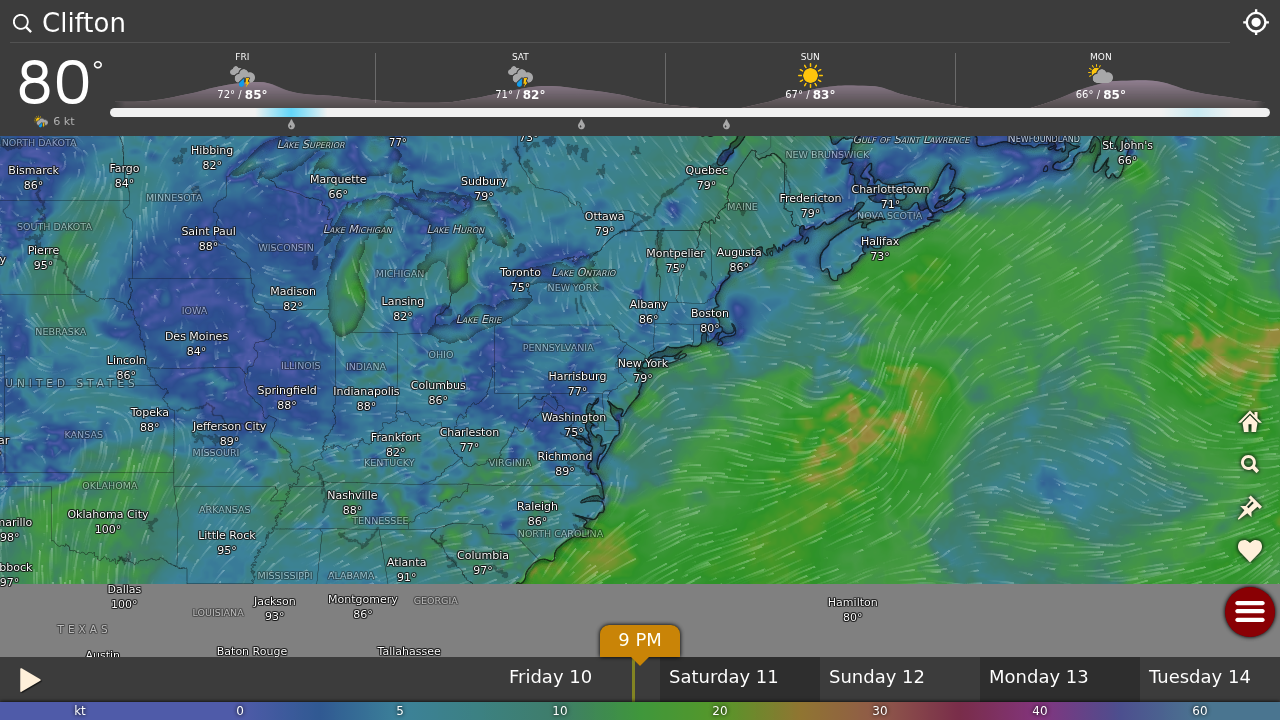
Windy.com is genuinely impressive as a meteorological visualisation tool. You get an interactive map with animated wind particles, multiple forecast layers (wind, gusts, temperature, rain, pressure and more), and the ability to switch between forecast models. That last point matters: different models, ECMWF, GFS, ICON among others, can disagree significantly, and Windy lets you compare them side by side.
For free users, Windy's AIFS model runs at 2.3 km resolution and updates twice a day. Premium subscribers get forecast updates at least four times a day and access to a 1-hour forecast step with a 10-day outlook, according to Windy's own subscription page. A Windy community thread from October 2024 noted that the difference in update frequency between free and premium tiers can actually lead to meaningfully different forecasts for the same location.
Windy.app (a separate product from windy.com) takes a similar approach but with a stronger focus on wind sports and a more detailed forecast grid interface, useful if you're comparing models or want a tabular breakdown.
Both tools are built with a broad outdoor audience in mind: kitesurfers, sailors, paragliders, hikers. Cyclists can absolutely use them. The question is how much work you want to do with the data once you've got it.
What Windy gives cyclists (and what you still have to do)
Open Windy, zoom to your area, and you'll see wind arrows flowing across the landscape. You can animate the timeline, check gusts, and look at rain probability. That's genuinely useful.
But here's the gap. Your route isn't a single point. A 50 km loop might run north for 15 km, east for 10, then curve back home from the south-west. A 20 km/h south-westerly behaves completely differently on each of those legs. On Windy, you're staring at a regional wind map and doing the geometry yourself, mentally working out whether the first section is a crosswind, the middle section is into the wind, and whether you'll get a tailwind home.
That's manageable once. But if you're checking multiple departure times across multiple routes across multiple days, the manual interpretation becomes exhausting. And for the specific question most cyclists are actually asking, "which of my usual loops should I ride this Saturday, and what time should I leave?", Windy can't give you a direct answer.
You can overlay a GPX route on some versions of Windy's tools, but this gives you a wind overlay at a point in time, not a route-specific forecast that accounts for where you'll actually be on the route at each hour. There's no single score telling you "ride now" or "wait two hours".
What Tailwind GPS does differently for cycling wind forecasts
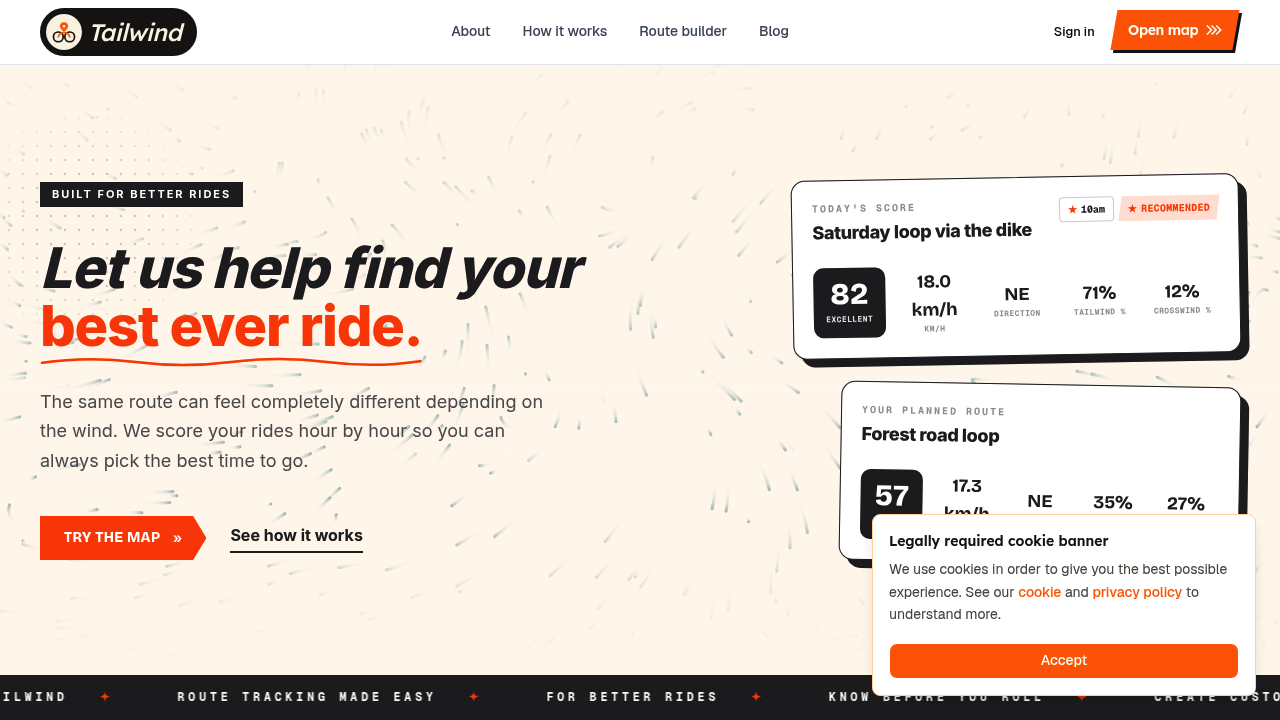
Tailwind GPS starts with the same forecast data but does something different with it. Every route is divided into individual segments. Hourly weather forecasts, wind direction, wind speed, temperature, and rain probability, are sampled along each segment. Crucially, the forecast is adjusted for when you'll actually be at that point, based on your average riding speed.
So if you set off at 8am and you ride at 25 km/h, Tailwind GPS knows you'll reach the 20 km mark around 8:48am, and calculates the wind conditions for that segment at that time. Not at 8am. Not "somewhere along your route". At the actual point and time.
The result is a Tailwind Score (0-100) for every departure hour:
- 80-100: Excellent, expect favourable tailwinds for most of the ride
- 55-79: Great riding conditions
- 40-54: Neutral
- 20-39: Challenging
- 0-19: Prepare for a tough ride
You can scroll through departure times in the morning and immediately see which hour gives you the best score. You can compare two or three of your regular routes on the same day. You don't need to interpret a wind map. The app's route scoring approach turns meteorology into a practical decision.
Free users get three days of forecasts. Subscribers unlock up to 14 days ahead, useful when you're lining up a weekend sportive, a club ride, or a holiday cycling trip weeks out. The 14-day planning window also includes alerts: weekly ride summaries, route-specific email notifications when your chosen score threshold is hit, wind score updates, and rain alerts during your preferred riding window.
There's also Headwind Training mode. Not everyone wants the easiest ride. If you're targeting deliberate headwind sessions to build strength, Tailwind GPS can highlight those conditions intentionally.
No app download is required. The whole thing runs in your browser, mobile-first, with a route carousel that makes comparing your saved loops a matter of seconds.
Accuracy and planning horizon: the real-world limitations
Fair warning on forecasts generally: beyond three or four days, any cycling wind forecast carries increasing uncertainty. Weather models diverge at longer ranges, and a 14-day score is useful for broad planning but shouldn't be treated as a firm prediction. The same applies to Windy's 15-day AIFS model (which, as Windy notes, updates just twice a day for free users).
For practical cycling use, here's how to think about each tool by timeframe:
- Same day (0-12 hours out): Both tools are at their most reliable. Windy gives you the clearest wind visualisation. Tailwind GPS gives you the clearest decision, departure hour, which route, what to expect.
- Tomorrow/2-3 days: Tailwind GPS scores are solid here for planning. Windy model comparison is worth checking if you're deciding between meaningfully different options.
- 4-7 days out: Use Tailwind GPS scores as a guide and re-check closer to the day. Windy's model switching is useful to see if ECMWF and GFS broadly agree, significant disagreement usually means the forecast is uncertain.
- 8-14 days: Directional planning only. A subscriber's 14-day Tailwind GPS window is great for spotting a promising window for a long ride, but treat any specific score as provisional.
For a how-to-plan-a-ride-with-wind overview, the short version is: use the longer horizon to identify candidate days, then confirm with the same-day forecast before you commit.
Feature-by-feature comparison (cycling-focused)
| Feature | Tailwind GPS | Windy (free) | Windy (premium) |
|---|---|---|---|
| Route-specific wind/headwind scoring | Yes (Tailwind Score 0-100) | No | No |
| Departure-time optimisation | Yes (per hour) | Manual inspection | Manual inspection |
| Personalised to riding speed | Yes | No | No |
| Wind map and layers | Yes (interactive) | Yes (rich layers) | Yes (more models/steps) |
| GPX route wind overlay | Route scoring | Overlay/spot only | Overlay/spot only |
| Forecast horizon (free) | 3 days | Up to 15 days (AIFS) | N/A |
| Forecast horizon (subscriber) | 14 days | N/A | 10-day outlook (1-hr steps) |
| Forecast model updates per day | Sampled hourly | 2 (free) | 4+ (premium) |
| Email alerts and score notifications | Yes (subscriber) | No | No |
| Weekly ride summaries | Yes (subscriber) | No | No |
| Headwind Training mode | Yes | No | No |
| Price (paid tier) | $2.99/month or $19.99/year | N/A | See Windy.com/subscription |
| Browser-based, no download | Yes | Partial (web available) | Partial |
So which should you choose?
Three realistic scenarios:
You have regular routes and want to know when to leave. If you ride the same few loops at weekends, or just want to know whether Saturday's club ride will be headwind-heavy on the way home, Tailwind GPS is the cleaner answer. Connect your Strava account, your routes load automatically, and you see departure-hour scores for the next three days (free) or 14 days (subscriber). Check the best departure time for a group ride approach if you're coordinating with others.
You're exploring somewhere new or want deep meteorological detail. Windy earns its place here. If you're scouting a remote mountain pass, checking whether a coastal route will be cross-wind or tailwind on a multiday tour, or wanting to compare what ECMWF thinks versus GFS, Windy's map layers are genuinely excellent. It's the better tool for exploratory, map-based wind inspection.
You want both. Plenty of cyclists use Windy to understand the broader weather picture (is this a sustained high-pressure system? is the wind backing or veering over the next 48 hours?) and Tailwind GPS to convert that picture into a specific route decision. Windy as the map; Tailwind GPS as the answer. That's a reasonable combination for cyclists who care about both meteorological context and practical ride planning.
For a broader look at how Tailwind GPS compares with other cycling-specific tools, the wind-aware cycling apps comparison covers a range of alternatives in detail.
FAQ
Can Windy show wind along my GPX route? You can load a GPX into some Windy tools and see a wind overlay on that route. What you won't get is a cycling-specific score that accounts for your direction of travel on each segment, your expected position on the route at each point in time, or a single number summarising how good the ride will feel. It's a map layer over your route, not a route-specific wind forecast built for cyclists.
Does Tailwind GPS replace Windy? No. Tailwind GPS isn't trying to be a meteorological visualisation tool. It doesn't have Windy's depth of model comparison, forecast layers, or global weather data. It's a cycling decision layer built on top of good forecast data. If you want to understand what's happening in the atmosphere across a region, Windy is stronger. If you want to know which of your saved routes to ride and when, Tailwind GPS is the cleaner answer.
How far ahead can I plan with each tool? Tailwind GPS free users get three days of route-specific forecasts. Subscribers unlock 14 days. On the Windy side, free users can access the AIFS 15-day forecast (updated twice daily), while premium subscribers get a 10-day outlook with 1-hour forecast steps and at least four updates per day, per Windy's own subscription page. For cycling purposes, the meaningful difference is that Tailwind GPS's 14-day subscriber window gives you scored, departure-hour forecasts for your actual routes, not just regional wind data to interpret yourself.
Is the Tailwind Score personalised to my speed? Yes. You set your average riding speed, and every score reflects your expected position on the route at each point in time. A faster rider and a slower rider on the same route on the same day can get different scores, because wind conditions change hour by hour and each rider will be at different parts of the route at different times. That personalisation is what separates a route-scoring tool from a generic spot forecast.
What's the difference between windy.com and windy.app? They're separate products. Windy.com is the original and better-known interactive wind map, widely used by a range of outdoor sports users. Windy.app is a distinct platform with a stronger focus on wind and water sports, offering more detailed forecast grids and model selection in a different interface. Neither is cycling-specific.
Stop guessing, ride when conditions are best
The same route can feel like a completely different ride depending on whether the wind is with you or against you. Getting that right isn't complicated, it just requires the right tool.
Windy shows you the wind. Tailwind GPS tells you what to ride.
If you want to see your regular routes scored by departure hour, import your GPX files or connect your Strava routes and check the forecast window across the coming days. The free plan covers three routes and three days of forecasts, enough to see exactly how route-specific scoring changes the way you plan a ride.
Try it now
Open the interactive wind map and compare departure-hour scores across your saved routes.
Related posts

Introducing Ride Huddles: a simple way to choose your next group ride
Ride Huddle is a simple way for groups to choose a route together. Create a Huddle, add your routes, share one link, and let everyone vote — free, with no account required.
·2 min read

How to navigate a cycling route without getting lost
Stay on the line with in-browser turn-by-turn: voice prompts, navigate-to-start, and rerouting. Tailwind GPS is the phone navigation — export GPX only for a head unit.
·8 min read

How to plan a cycling route and navigate it on your phone
Plan a cycling route on your phone, pick the best hour, then start in-browser turn-by-turn. Tailwind GPS includes voice prompts, navigate-to-start, and rerouting.
·6 min read